
From finding misplaced keys to reading recipes and identifying objects, new developments in artificial intelligence (AI) are creating more ways for people who are blind or have low vision to access information and navigate everyday life.
For many years, smartphone apps such as Seeing AI have helped people with vision impairment understand the world around them. By pointing a phone’s camera at an object, document or scene, users can have text read aloud or receive an audio description of what is in front of them.
Now, advances in AI are taking this technology a step further.
Newer apps are making it possible to interact with information in real time, ask follow-up questions and receive more responsive feedback as situations change.
According to VisAbility Tasmania’s Assistive Technology Specialist, Jordan Bush, two apps worth exploring are Oorion and Gemini Live.
He says while they offer different features, both have the potential to make everyday activities easier for people across the spectrum of vision impairment.
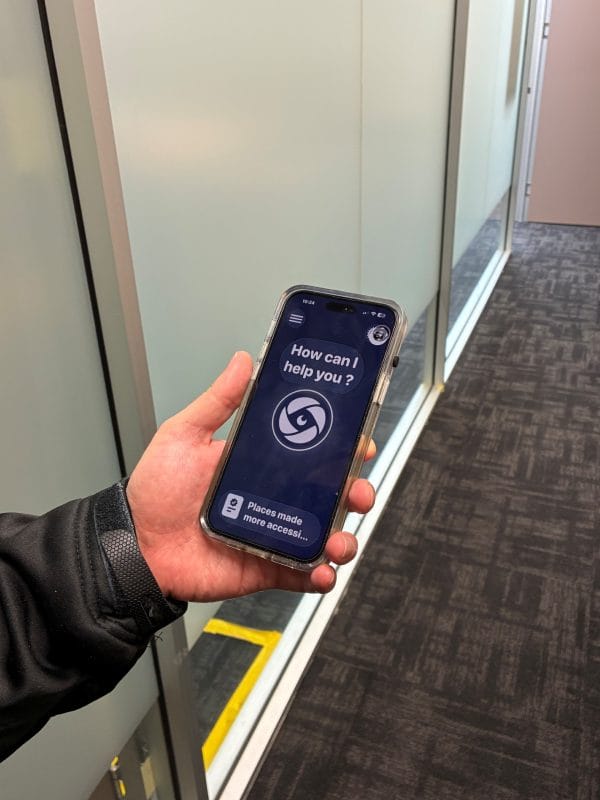
Oorion: Helping you find what you’re looking for
Have you ever misplaced your keys, struggled to find the television remote or needed help locating a particular item on a shelf?
Jordan describes Oorion is an iPhone app designed to help people who are blind or have low vision locate objects and identify text using their phone’s camera.
What makes Oorion particularly useful is its ability to actively search for something rather than simply describe a still image.
For example, you can ask the app to find your shoes or television remote. As you move your phone around, Oorion provides spoken feedback about what it can see, letting you know when it identifies the object and guiding you towards its location.
He says it can also help you find text, such as a sign, and provide descriptions of objects and surroundings.
“Another useful feature is the ability to teach Oorion to recognise personal belongings, helping it distinguish between similar items, such as a particular set of keys or a favourite photo frame,” Jordan says.
The app can also be accessed using Siri and voice shortcuts, making it easier to use when needed.
Currently available for iPhone, with Android compatibility being developed, Oorion offers another practical tool for finding things and accessing visual information more independently.
Gemini Live: An AI assistant you can talk to
Google’s Gemini Live takes a slightly different approach, says Jordan, offering a conversational AI assistant that can respond to questions about what you are seeing through your phone’s camera.
Available on compatible Android phones and iPhones, Gemini Live allows users to ask questions, receive spoken responses and continue the conversation with follow-up questions.
“Imagine you’re preparing dinner and following a recipe.”
“You could use Gemini Live to help read the cooking instructions, identify ingredients in your kitchen and suggest substitutes for something you don’t have,”
“And then you could continue asking questions as you prepare the meal, without having to start a new search each time,” he says.
The technology can also assist with identifying objects, describing surroundings, answering general questions and, on supported devices, discussing information displayed on your phone screen.
While Gemini Live is available on both Android and iPhone, its integration with Android devices is generally more extensive.
There are still some accessibility limitations. For example, activating camera and screen-sharing functions may require selecting controls on the screen, which can be difficult for someone with low vision.
Google is working on accessibility improvements, including Guided Vision access on supported Android devices, to make these features easier to use.
Making technology work for you
Knowing an app exists is one thing. Knowing how to make it useful in everyday life is another.
That’s where VisAbility’s Assistive Technology specialists like Jordan can help.
“Our team works with clients to explore technology that supports their individual goals, whether that’s reading information, locating everyday objects, accessing digital content or completing tasks more independently.”
Training can include setting up apps, creating shortcuts and voice commands, and learning how to access useful features quickly and confidently.
As with any AI-powered technology, users should be aware that descriptions and answers are not always accurate. These apps should not replace established mobility techniques or be relied upon for safety-critical decisions.
Interested in learning more?
Contact VisAbility’s friendly team to find out how our Assistive Technology services can help you make the most of your smartphone and discover new ways to access information, build confidence and support independence.